
How to Enable the Claude Model in Microsoft Copilot for Your Tenant
Microsoft has made Anthropic a subprocessor for Microsoft Online Services, which changes how Claude works inside Microsoft 365 Copilot. The old opt-in flow through the admin center has been replaced by a new model where Claude is on by default for most tenants. This guide covers what changed, what you need to do as an admin, how to disable it if needed, and how users actually access Claude once it is available.
What Claude in M365 Is
Claude is Anthropic’s family of AI models. In the same way that Microsoft 365 Copilot has traditionally used OpenAI models behind the scenes, Claude is another large language model that can read, reason, summarize, write, analyze, and help users work through complex tasks.
Anthropic describes Claude as an AI assistant built around language, reasoning, analysis, coding, and other knowledge work. The Claude family includes different models for different types of work. In Microsoft 365 Copilot, the most relevant ones are Claude Sonnet and Claude Opus. Sonnet is generally positioned as a strong everyday model, while Opus is aimed at more advanced reasoning and complex work.
For Microsoft 365 users, the important part is that Claude is not a separate chatbot you need to open in another browser tab. When it is enabled for your tenant, Claude can appear inside Microsoft 365 Copilot experiences, such as Researcher, Copilot Studio, Agent Mode in Excel, and certain Word, Excel, and PowerPoint agent experiences. Microsoft also shows UI indicators when Claude models are being used, so users can tell when they are working with an Anthropic model instead of the default Copilot model.
What Changed
Previously, admins had to explicitly opt in to Anthropic's commercial terms through a separate toggle in the admin center. That toggle is being deprecated.
Anthropic is now a Microsoft subprocessor, which means the data handling sits under Microsoft's enterprise commitments rather than a separate Anthropic commercial agreement. The Microsoft Customer Copyright Commitment applies, and data is governed under the same Microsoft Data Protection terms that cover the rest of your Microsoft 365 services.
For most commercial tenants, Anthropic is now enabled by default. You do not need to do anything to turn it on. The exception is EU, EFTA, and UK regions, where it is off by default due to data residency requirements.
Pre-Requisites and Permissions
Before enabling Claude for the tenant, ensure:
- You have global administrator or AI Administrator privileges
Only users in the global administrator role can configure tenant-level AI provider settings. - Your tenant has Microsoft 365 Copilot licenses
Users must have valid Copilot licenses before they can access the Claude model via the Researcher agent. - You understand the data sharing and compliance implications
Because your data will be handled outside Microsoft’s managed environment.
Enable Claude for the Tenant
If Your Tenant Is in a Standard Commercial Region (US, etc.)
Anthropic should already be enabled in your tenant. There is nothing you need to turn on. You can verify this by following the steps below.
- Sign in to the Microsoft 365 admin center at admin.microsoft.com.
- In the left navigation, select Copilot.
- Select Settings > (View All, if needed)
- Look for the AI providers or subprocessors section. You should see Anthropic listed as enabled.
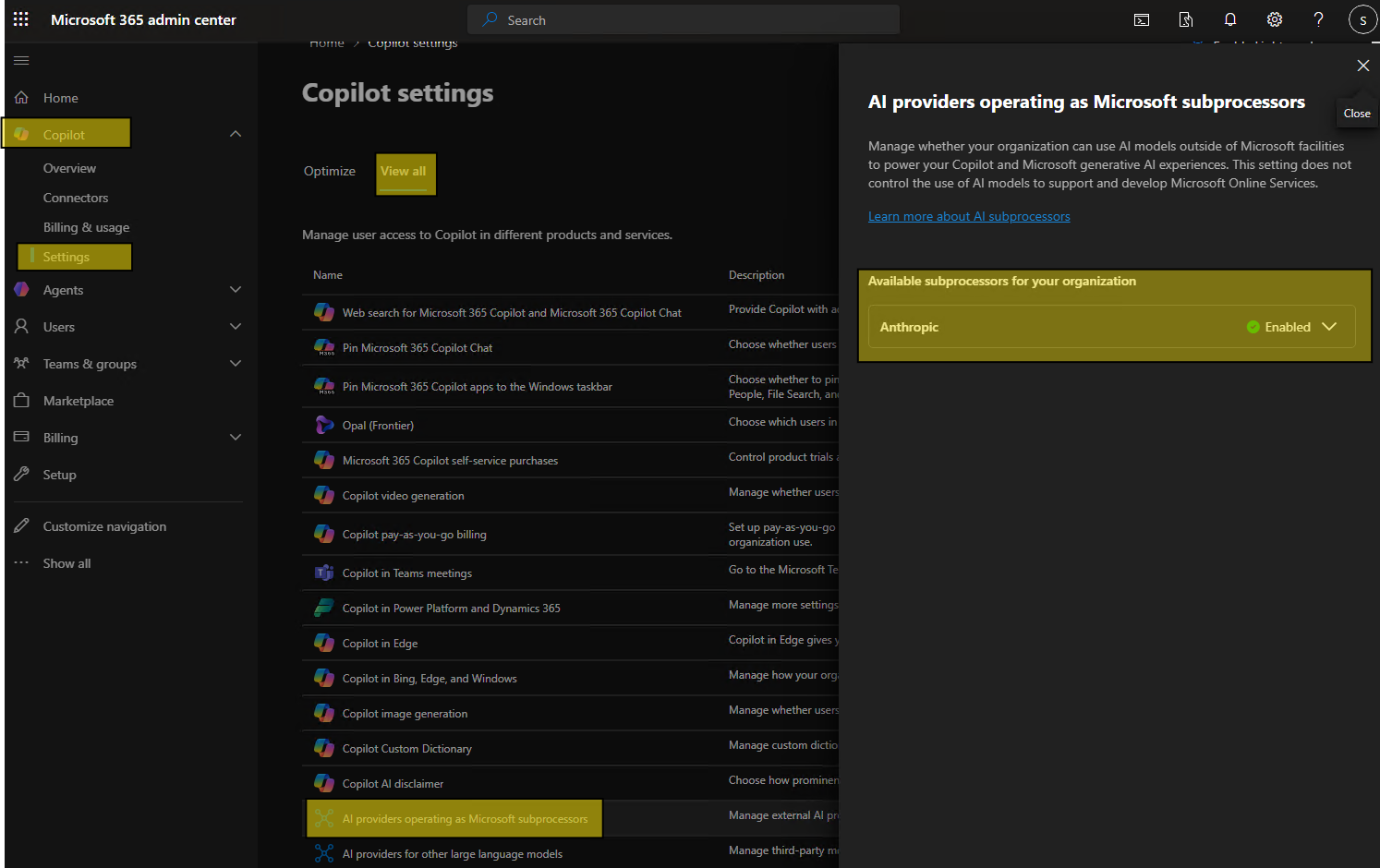
If it is already on, your licensed Copilot users can start using Claude right away through the Researcher agent.
If Your Tenant Is in the EU, EFTA, or UK
Anthropic is off by default in these regions. To enable it, you need to explicitly opt in. You must be a Global Administrator to do this.
- Sign in to the Microsoft 365 admin center at admin.microsoft.com.
- Go to Copilot, then select Settings.
- Find the Anthropic subprocessor setting.
- Toggle it on and confirm the change.
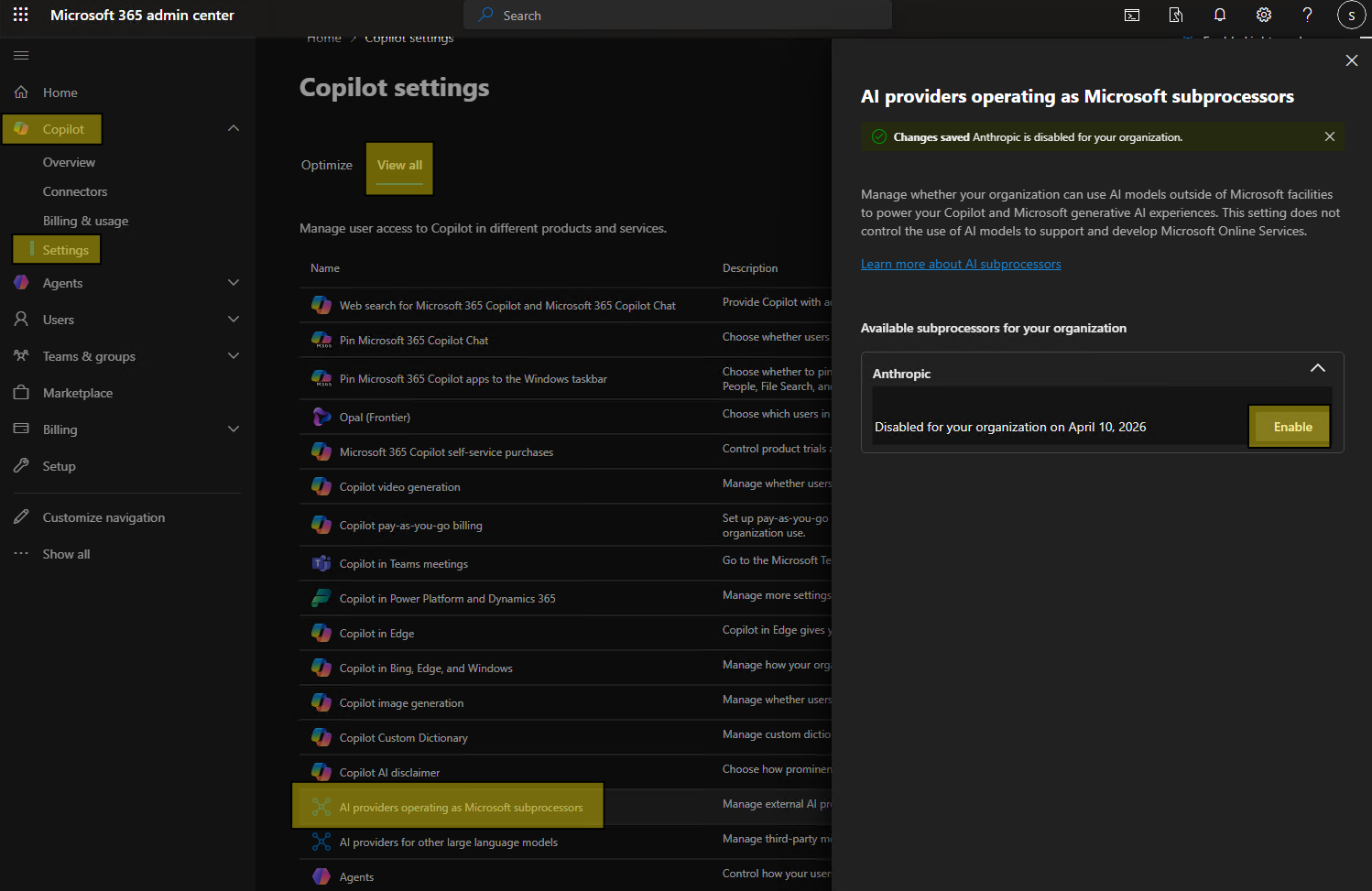
Once enabled, allow a few hours for the setting to propagate across your tenant before testing with a licensed user.
How Users Access Claude
Once Anthropic is enabled at the tenant level, here is how a licensed user switches to Claude in Copilot.
- Open the Microsoft 365 Copilot app at m365copilot.com, or from the desktop app.
- In the left navigation under Agents, select Researcher.
- Inside the Researcher agent, look for the model selector and choose Claude.
Claude is available for the duration of that session. When the user closes the Copilot app or the session ends, Copilot automatically reverts to the default model. The user will need to select Claude again next time if they want to use it.
How to Disable Claude if Needed
If your organization wants to block access to Claude, you can turn off Anthropic as a subprocessor. This requires Global Administrator access.
- Sign in to the Microsoft 365 admin center at admin.microsoft.com.
- Go to Copilot, then Settings.
- Find the Anthropic subprocessor setting and toggle it off.
- Confirm the change.
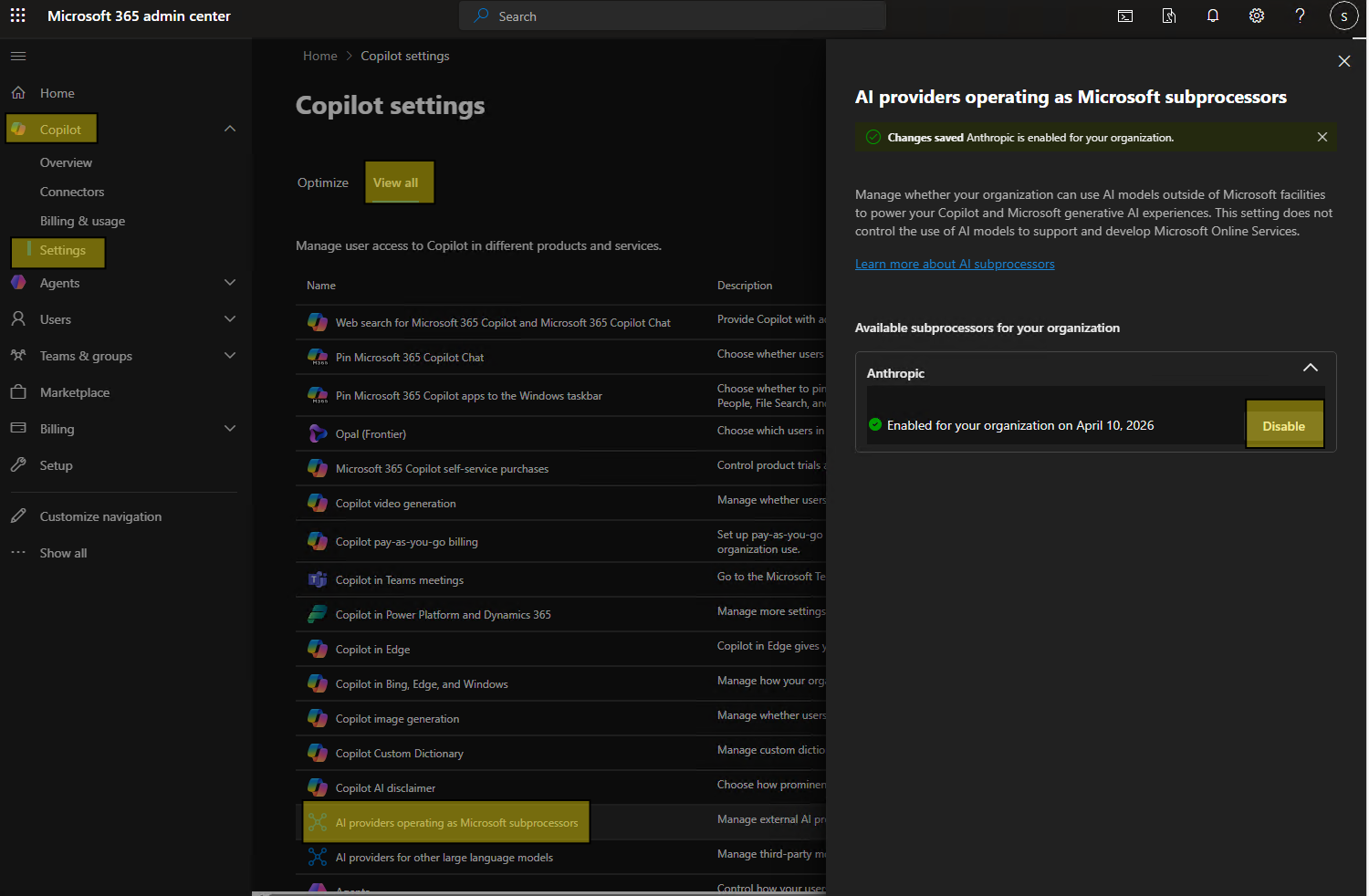
Once disabled, users will no longer see Claude as an option in the Researcher agent. Some Copilot features that rely on Anthropic models may also become unavailable. Allow a few hours for the change to fully take effect across the tenant.
Note: if you had previously used the legacy opt-in toggle and then turn off Anthropic under the new subprocessor model, the toggle will be set to Off by default if it is re-enabled later. You would need to turn it back on manually.
Group-Based Controls Have Arrived
When this feature first started rolling out, the Anthropic setting was mostly tenant-wide. That meant admins had a simple choice: enable Anthropic for the tenant or disable it for the tenant.
That has changed. Microsoft’s current documentation now shows group-based controls for Anthropic models in the Microsoft 365 admin center. Admins can restrict access to specific users or Microsoft Entra ID security groups. These assignments are applied at the provider level and are enforced across Microsoft 365 Copilot and Copilot Studio experiences. In other words, if you limit Anthropic access to a pilot group, only those assigned users should be able to use Copilot features or agents that rely on Anthropic.
This is useful if you want to test Claude with a smaller group before opening it up more broadly. For example, you might enable it first for your AI pilot users, legal team, research team, or a group of power users who are already comfortable testing new Copilot features.
How to Configure Group-Based Access for Anthropic
To manage access:
- Sign in to the Microsoft 365 admin center.
- Go to Copilot.
- Select Settings.
- Select View all.
- Choose AI providers operating as Microsoft subprocessors.
- Under the available subprocessors, select Anthropic.
- Under Choose who can access Anthropic models for Copilot and generative AI experiences, select the users or groups that should have access.
- Save the change.
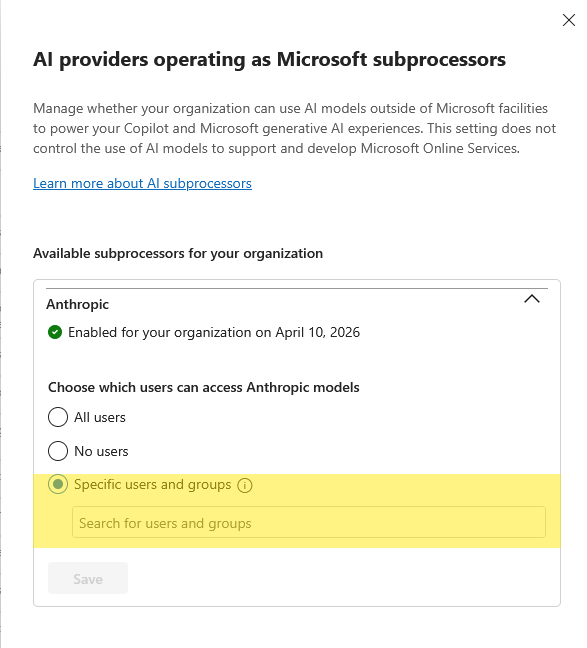
If you are in a region where Anthropic is off by default, such as the EU, EFTA, or UK, you still need to enable Anthropic first. After that, you can scope access to the users or groups you want.
A few notes are worth calling out:
- The control is at the provider level, not the individual Claude model level.
- Microsoft Entra ID security groups are supported.
- If a user is not included in the assignment, they should not be able to use Copilot features or agents that rely on Anthropic.
- Some experiences may be affected if they depend on Anthropic models and the user does not have access.
- Anthropic models are still excluded from the EU Data Boundary and in-country processing commitments where those apply.
This is a better admin model than the original tenant-wide switch. It lets you take a more practical rollout approach: start small, test real use cases, confirm your compliance position, then expand access when your organization is ready.
Data Privacy: What Is Different Now
This is the main thing that changed with the subprocessor model and it is worth understanding.
Under the old setup, when a user invoked Claude, data was processed under Anthropic's separate commercial terms. It was essentially a direct arrangement between your organization and Anthropic.
Under the new subprocessor model, Anthropic processes data on Microsoft's behalf. This means:
- The Microsoft Customer Copyright Commitment applies to Claude outputs just as it does for other Copilot outputs.
- Data is governed under the Microsoft Online Services Data Protection Addendum.
- Microsoft takes on data protection responsibility as the primary processor.
For most organizations this is an improvement from a compliance standpoint because it fits within the existing Microsoft data governance framework rather than requiring a separate review of Anthropic's terms. That said, if your organization is in a regulated industry, it is still worth looping in your legal or compliance team before enabling it, particularly if you are in the EU, EFTA, or UK.
Communicating This to Your Users
Most users who have a Copilot license will not notice Claude is available unless you tell them. It does not appear prominently, and many people who use Copilot every day have not explored the Researcher agent in detail.
A short communication explaining that Claude is now available, how to access it in the Researcher agent, and what it is good for will go a long way. If your organization has any sensitivity around which AI models are used for what types of work, it is worth including guidance on that as well.
How Microsoft Is Becoming the UI for AI
The Claude integration is a good example of where Microsoft 365 Copilot is heading. Microsoft is not just trying to make one chatbot. It is turning Copilot into the front end for different AI models, agents, business data, and Microsoft 365 apps.
In the early days of Copilot, most people thought about it as “the AI button” inside Word, Excel, PowerPoint, Outlook, or Teams. Now it is becoming more of a work interface. A user can open Copilot, ask a question, use an agent, pull from Microsoft Graph, search the web, work with files, and in some cases choose which model should handle the task.
Claude is part of that strategy. Microsoft announced that Microsoft 365 Copilot would continue using OpenAI models, while also adding Anthropic models for customers who want more flexibility. Claude first showed up in places like Researcher and Copilot Studio, where model choice makes sense because the tasks are more advanced. Microsoft has also been extending Anthropic model support into app-based Copilot experiences, including Excel and PowerPoint, with Word support planned as well.
For admins, this means Copilot is becoming less about one AI model and more about governance. The real admin work is deciding which providers are allowed, which users can access them, which agents are approved, and how organizational data is protected. Microsoft is trying to keep that control surface in the Microsoft 365 admin center, the Power Platform admin center, Copilot Studio, Entra ID, and Purview instead of forcing every AI provider to become its own separate governance project. For additional Copilot governance, check out 3 Copilot admin settings to check right now for better governance.
For users, the experience should feel simpler. They should not have to know where the model is hosted, which provider is best for a specific task, or how to connect their work data manually. Microsoft wants Copilot to be the place where the user asks for help, and the platform decides how to bring together the right app, the right data, the right agent, and the right model.
Frequently Asked Questions
Is there an extra cost to use Claude in Copilot?
There is no additional Microsoft licensing cost. Claude access is included as part of the Microsoft 365 Copilot license. Under the new subprocessor model, you are not entering a separate commercial agreement with Anthropic.
Can I limit Claude to specific users right now?
Not yet at the tenant level. The setting is currently all-or-nothing for licensed Copilot users. Group-based controls are coming in late April 2026. In the meantime, you can manage expectations through communication and training rather than technical controls.
What happens if I was using the old opt-in toggle?
The old toggle is being deprecated. Microsoft is migrating tenants to the new subprocessor model automatically. If you had opted in previously, your access to Claude should continue under the new model without any action needed. If you had opted out, you may want to check whether Anthropic has been enabled in your tenant since the default behavior has changed.
Does Claude work in Teams or Outlook directly?
Claude is currently available through the Researcher agent in the Microsoft 365 Copilot app. It is also used in certain other Copilot surfaces like Agent Mode in Excel and Word, Excel, and PowerPoint agents where Anthropic models are available as an underlying option. It is not a direct model selector in Teams or Outlook.
What is the Researcher agent?
Researcher is an agent built into Microsoft 365 Copilot that is designed for deep research tasks. It can search the web, pull from your Microsoft 365 data, and synthesize information across sources. It is one of the more capable Copilot features and a good place to try Claude, since Claude tends to perform well on analytical and research-heavy tasks.
Final Thoughts
The shift to the subprocessor model is a meaningful improvement for most organizations because it brings Claude under Microsoft's data governance umbrella rather than sitting outside it. For the majority of commercial tenants, Claude is already available in your tenant right now and your users can start using it today through the Researcher agent.
If you are an admin who previously opted out of Claude for compliance reasons, it is worth revisiting that decision now that the data handling model has changed. And if you are in the EU or UK, you will need to make an explicit choice to opt in if you want your users to have access.