
Microsoft 365 Targeted Release: What It Is, How to Enable It, and When to Use It
Microsoft 365 does not sit still. Features and service updates roll out continuously, and if you are running a mid-size or larger organization, the last thing you want is for users to open SharePoint one morning and find something changed with no warning. Targeted Release is Microsoft's answer to that problem. It is an opt-in program that gives admins and selected users earlier access to certain Microsoft 365 updates, so IT teams can validate changes, prepare support staff, update documentation, and communicate before the broader rollout reaches everyone.
This article explains what Targeted Release actually does, how to turn it on, who should be in your pilot group, and the common mistakes that trip people up.
What Is Microsoft 365 Targeted Release?
Targeted Release is an early-access ring for supported Microsoft 365 cloud-service features. Admins can opt in either the whole organization or a selected group of users to receive certain updates before they reach the Standard Release population. Microsoft describes it as a way for users to be among the first to see the latest updates and to help shape the product by providing early feedback.
If you come across older documentation or community posts that mention "First Release," that is the same thing. Microsoft renamed First Release to Targeted Release a few years ago, but the old name still shows up in scripts and forum threads.
The key thing to understand upfront: Targeted Release is a best-effort program, not a precise deployment schedule. Microsoft explicitly says release options are "targeted, best effort" and cannot be guaranteed at all times or for every update. Do not treat it as a way to predict the exact day a feature lands. Think of it as a preview window, not a calendar.
How Targeted Release Fits Into Microsoft's Release Process
Before a feature reaches Targeted Release customers, Microsoft has already run it through internal validation: the feature team tests it first, then the broader Microsoft 365 team, and then across Microsoft as a whole. Targeted Release is the first external customer-facing ring after that internal validation passes.
From there, Microsoft monitors usage metrics and collects feedback at each stage before expanding to broader rollout. This is why Targeted Release is genuinely useful for governance. You are getting real features in a real production environment, just earlier than most customers.
Which Services Does Targeted Release Cover?
Targeted Release applies to a specific set of Microsoft 365 services, not everything across the platform. As of Microsoft's current documentation, supported services include:
- New Outlook
- OneDrive
- SharePoint in Microsoft 365
- Microsoft 365 for the web
- Microsoft 365 admin center
- Some components of Exchange Online
- Microsoft Teams
If you are seeing large UI changes roll out in SharePoint, like the SharePoint Online redesign, Targeted Release is one of the mechanisms that lets pilot users see those changes before the rest of the organization.
One thing that catches people off guard: Targeted Release has nothing to do with desktop Office app updates. Word, Excel, PowerPoint, and classic Outlook desktop updates are controlled through Microsoft 365 Apps update channels like Current Channel, Monthly Enterprise Channel, and Semi-Annual Enterprise Channel. If you want to manage when those apps get new features, that is a separate admin setting entirely. Targeted Release only affects cloud-delivered service changes.
Teams also has its own preview model. Microsoft Teams Public Preview is controlled through Teams update policies and gives users early access to unreleased Teams features. Importantly, Microsoft says the Teams Public Preview policy has no effect on users who are part of Microsoft 365 Targeted Release. They are separate controls, and you may need both depending on what you are trying to preview.
Targeted Release vs Standard Release
Standard Release is the default option for every Microsoft 365 tenant. Users on Standard Release get updates when Microsoft releases them broadly. There is no action required to stay on Standard Release, and it is the right setting for most production users.
Targeted Release gives earlier access to the same updates for supported services. The gap between when something lands in Targeted Release and when it reaches Standard Release varies. For new Outlook specifically, Microsoft has documented that new features become available in Targeted Release for approximately 30 days before rolling out to Standard Release customers.
Even Standard Release is staged, though. A feature does not appear for every Standard Release tenant at the exact same moment. Microsoft rolls things out progressively, which is part of why Message center posts cannot give you a precise date for when something will appear in your specific tenant.
How to Enable Targeted Release
You need to be a Global Administrator to change release preferences. Here are the steps:
Video with steps to enable targeted release video
- Sign in to the Microsoft 365 admin center.
- Go to Settings, then Org settings.
- Select the Organization profile tab.
- Select Release preferences.
- Choose your option:
- Standard release — default, no early access
- Targeted release for everyone — all users in the org get early access
- Targeted release for selected users — only the users you choose get early access
- If you choose selected users, use Select users to add them individually, or Upload users to add them in bulk via CSV.
- Select Save.
Microsoft says changes can take up to 24 hours to take effect. If you switch back to Standard Release after enabling Targeted Release, users may temporarily lose access to features that have not yet reached Standard Release.
Because this setting lives in the admin center and requires Global Admin access, it is worth pairing with a review of your other admin-level Microsoft 365 settings. The Microsoft 365 admin settings and governance article covers other controls worth auditing while you are in that area of the admin center.
Which Option Should You Choose?
For most organizations, the right answer is Targeted Release for selected users. You keep most of the tenant on Standard Release and give early access to the people who actually need it: IT, help desk, security reviewers, and change champions.
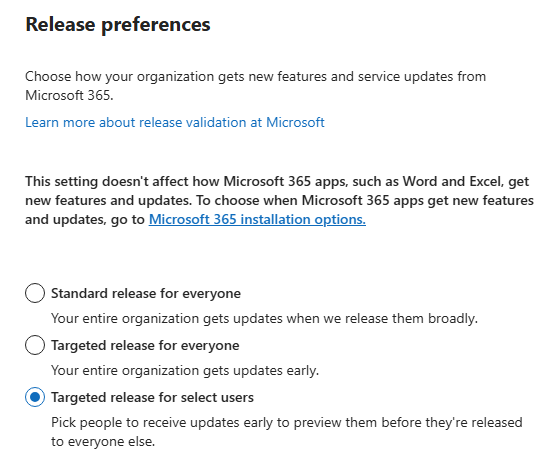
Microsoft recommends this approach and explicitly says to "only assign specific users." If you want to test with a larger group or the full org, Microsoft recommends using a test subscription rather than your production tenant. In fact, for organizations with more than 300 users, Microsoft specifically suggests a test subscription if you want the "Targeted release for entire organization" option.
Good candidates for your Targeted Release pilot group include:
- Microsoft 365 admins
- Help desk and service desk staff
- SharePoint and OneDrive owners
- Teams workspace owners
- Security and compliance reviewers
- Training and communications owners
- Department champions and power users who can test practical workflows
One thing Microsoft specifically calls out: include help desk users. Your support staff should see changes before users ask about them, not after. If the help desk is on Standard Release and a Targeted Release feature starts generating tickets, your team will be behind from day one.
Targeted release for the entire org makes sense for small organizations comfortable with frequent change, dedicated test tenants, IT consultancy lab tenants, or organizations that deliberately want to run ahead of Standard Release as a policy decision.
What to Do With Early Access
Getting early access to a Microsoft 365 change is only useful if your team does something with the preview window. The organizations that get the most out of Targeted Release treat it as a structured pilot, not just a curiosity.
Pilot users should be expected to report more than just "it looks different." A useful pilot review covers UI changes that affect daily workflows, broken or changed integrations, admin setting implications, documentation that needs updating, training materials that need new screenshots, likely support questions, and any compliance or security concerns the change raises.
A repeatable cadence helps. A practical model looks like: weekly review of Message center and the Microsoft 365 Roadmap; biweekly review of pilot feedback; monthly update of internal documentation and training materials; and a support brief and user communication prepared before any major change reaches Standard Release.
How Targeted Release Connects to Message Center and the Roadmap
Targeted Release works best when paired with the other Microsoft change-management tools, not as a standalone setting.
The Microsoft 365 Roadmap shows features that are in development, rolling out, or launched. If Targeted Release is available for a feature, the Roadmap's rollout start date reflects when it begins appearing in Targeted Release, followed by Standard Release. That sequencing is useful for planning.
Message center is where Microsoft communicates tenant-relevant timing for individual changes. Major updates are communicated at least 30 days in advance when action is required. Message center tags like "major update," "admin impact," and "user impact" help you triage what needs attention. The limitation is that Message center cannot tell you the exact date a change will appear in your specific tenant. Even with that limitation, it is your best source for upcoming change context.
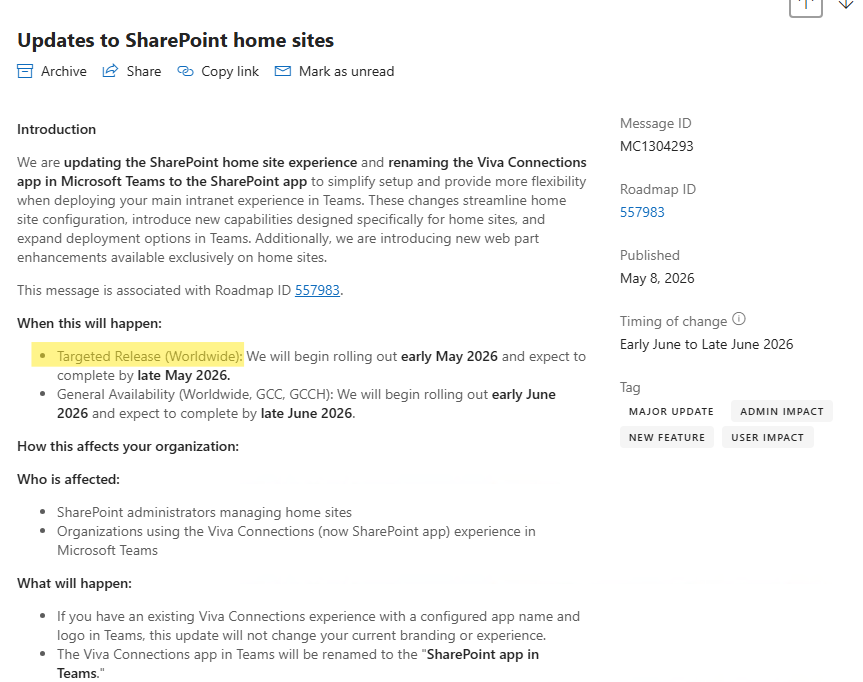
A workflow that works well: monitor the Roadmap for features coming up, watch Message center for timing and required actions, validate changes with your Targeted Release pilot users, document the user impact, prepare help desk and training materials, and communicate before Standard Release reaches most users.
Targeted Release and the Newer Release Options
Microsoft has been introducing additional release options alongside the classic Targeted/Standard model, particularly around Microsoft 365 Copilot and AI-related features.
Standard Release remains the default for most organizations. Deferred Release can delay Copilot-related generally available features by up to 30 days for tenants that need more review time before adoption. Frontier provides pre-general availability access to emerging AI capabilities for organizations that want to stay ahead of those changes.
Targeted Release continues to serve its role for supported Microsoft 365 services like SharePoint, OneDrive, new Outlook, and parts of Teams and Exchange. If you are using or considering Frontier for Copilot capabilities, the Microsoft Frontier program explainer covers how that works and what admins need to enable it. Targeted Release and Frontier address different parts of the Microsoft 365 change landscape, and depending on your organization, you may find both relevant.
Common Mistakes to Avoid
A few things consistently trip up admins who are new to Targeted Release.
- Enabling Targeted Release for everyone in a large production tenant is the most common one. Microsoft recommends using a test subscription if you have more than 300 users and want the full-org experience. Exposing an entire production tenant to early-access changes without a structured pilot process is asking for a bad day.
- Assuming selected users will preview every feature is another one. Some features roll out only at the organization level. When that happens, selected Targeted Release users do not get early access regardless of their individual setting. You need the whole org on Targeted Release, or a test tenant, to preview those changes.
- Treating Targeted Release as a deployment schedule causes problems too. Microsoft does not guarantee exact timing for all releases, and Message center cannot tell you the specific date a change will appear in your tenant. Use the Roadmap and Message center for approximate timing, not Targeted Release as a precision tool.
- Not including help desk users is one that bites organizations repeatedly. Include your service desk in the pilot group from the start.
And do not confuse Targeted Release with Microsoft 365 Apps update channels. If you want to control when Word, Excel, or PowerPoint desktop apps get new features, that is a completely separate setting managed through Microsoft 365 Apps admin controls. Targeted Release does not touch those.
Frequently Asked Questions
Is Targeted Release enabled by default?
No. Standard Release is the default for every Microsoft 365 tenant. You have to opt into Targeted Release manually through the Microsoft 365 admin center as a Global Administrator.
Can I enable Targeted Release for only some users?
Yes. Choose Targeted release for selected users in Release preferences and add users individually or upload them in bulk via CSV. This is the recommended approach for most organizations.
How long does it take for the setting to take effect?
Microsoft says release preference changes can take up to 24 hours to apply. Do not expect changes to be immediate.
Will selected users see every upcoming Microsoft 365 feature early?
Not necessarily. Some features only roll out at the organization level, so selected Targeted Release users may not receive them early. To preview all Targeted Release features, you need the full organization on Targeted Release or a dedicated test tenant.
Does Targeted Release control Word, Excel, and PowerPoint desktop updates?
No. Desktop Microsoft 365 Apps updates are managed through update channels: Current Channel, Monthly Enterprise Channel, and Semi-Annual Enterprise Channel. Targeted Release only affects cloud-delivered Microsoft 365 service experiences.
Can I switch back to Standard Release after enabling Targeted Release?
Yes, but there is a catch. If you switch back, users may temporarily lose access to features that have not yet reached Standard Release. Factor that in before making the switch mid-deployment.
Is Targeted Release available in government cloud environments?
Yes. Microsoft documents Targeted Release availability for customers on Office 365 GCC, GCC High, and DoD plans for supported services including new Outlook, OneDrive, SharePoint, Microsoft 365 for the web, the Microsoft 365 admin center, and some Exchange Online components.
How is Targeted Release different from Microsoft Teams Public Preview?
They are separate controls. Targeted Release is configured in the Microsoft 365 admin center and applies to supported Microsoft 365 services. Teams Public Preview is a per-user setting managed through Teams update policies. Microsoft specifically notes that Teams Public Preview policies have no effect on users who are part of Microsoft 365 Targeted Release. You may want both enabled for comprehensive early access to Teams changes.